ATTENTION

Selamat datang Di Blog Saya,disini merupakan Blog untuk saya menulis dan mengumpulkan berita dari berbagai sumber dan saya rangkum untuk disajikan kepada anda semua.

Artikel yang saya sajikan disini ada yang dari saya sendiri maupun dari sumber lain yang saya sadur dan yang saya sebutkan sumbernya .

Gambar yang saya muat disini saya ambil dari search google yang sesuai dengan artikel yang saya tampilkan.

Jika ada Pengaduan yang mengklaim artikel ataupun gambar dalam Blog saya ini sebagai miliknya, maka kami akan mengecek kebenaranya dan jika memang benar, kami bersedia menghapusnya dari Blog saya ini.

Sekali lagi niat kami hanya menginformasikan dan menyebarluaskan pengetahuan yang kami anggap perlu untuk kami berikan kepada umum tanpa berniat mengakui atau mengklaim artikel atau file yang bukan milik kami.

Terimakasih atas segala perhatian dari para pengunjung blog ini.

Tampilkan postingan dengan label Software. Tampilkan semua postingan

4 April 2012

Cara Mengembalikan File Yang Sudah Delete Permanent

ernah gak temen2 secara kagak sengaja menghapus file atau folder penting secara permanen?,Mau Ingin Mengembalikan File?,Ini Dia

WinUtilities Undelete Jawabanya.
[Image: free-undelete.gif]

WinUtilities Undelete adalah tool recovery data yang dapat membantu kita mencari data yang terhapus secara permanen dan mengembalikannya ke tempat yang kita inginkan. Tool ini bisa juga untuk mengembalikan data dari storage eksternal (flashdisk) atau kartu memori kamera digital yang terformat.

Bagaimana Cara Menggunakan?
[Image: 28tw404.jpg]
Cara menggunakan ini tool cukup mudah (user friendly dah). Setelah instalasi, buka aplikasinya dan klik drive dimana kita akan mencari file yang hilang di sisi sebelah kiri. Setelah tool tersebut melakukan scanning akan muncul semua file yang ada di drive tersebut beserta file-file yang sudah kita delete secara permanen. So..tinggal anda pilih file mana yang akan anda kembalikan dengan cara klik kanan file tersebut dan klik undelete.


Download Here

29 Februari 2012

Serial Key For All The Trial Software

Nih .....SOB biar gk pusing lagi cari serial key softwarenya.......


Download Here

Vtot NYa

[Image: qdqdq.jpg]

Credit : ajendra Khope

28 Februari 2012

Download Software pembuat Frame

Odin Frame Photo Creator

Odin Frame Photo Creator 5.5.4-GOATD
Yakni Software untuk Buat Bingkai | Latar atau Frame Fhoto, sangat cocok bagi sobat yang hoby grapis. dengan software ini sobat tidak perlu buat Frame secara manual lewat Photosshop karena sudah disediakan berbagai macam Frame, kita juga bisa membuat frame hasil karya sendiri. Selain itu Softwrae ini bisa juga untuk mengedit foto, meningkatkan kualitas, cetak, dan mengelola foto digital.
Program mungkin menerapkan kerangka kerja dan berbagai efek, membuat foto Anda berkesan.


Software ini juga menawarkan jenis latar belakang yang berbeda (frame), misalnya, bunga, rumput, samudra, kartun, binatang untuk membantu Anda mengambil warna-warni photos.Sebelum mencetak atau menyimpannya dalam komputer, Anda juga dapat mengeidit foto dalam editor foto dengan mengubah warna foto, menyesuaikan warna, ketajaman, warna RGB , flip dan rorate photos.And Anda juga dapat menambahkan gambar dasar dan beberapa wajah lucu seperti ekspresi wajah lucu pada foto.


Link Pemasaran disini : Odin Frame Photo Creator 
Silahkan download gratis disini :Odin Frame Photo Creator

23 Februari 2012

Sound Forge Audio Studio 10.0 Build 177

Sound Forge Audio Studio 10.0 Build 177 - Free

 Sound Forge Audio Studio software is everything you need to produce professional-quality audio on your home PC - no more renting expensive studio time to get the results you want. Record just about anything, edit and restore audio, burn your own CDs, create streaming media, and convert files with lightning speed - all using drag-and-drop actions and simple commands such as cut, copy, and paste.


Sound Forge Audio Studio software is the workhorse of audio editors, and it just keeps getting better. You'll find that the new features in this version will help simplify your life by consolidating common tasks and allowing you to customize the software to suit your needs.


Sound Forge Audio Studio software is an easy-to-use home version of our Sound Forge professional software - the industry standard for audio editing and mastering on the PC platform. Built on award-winning technology used by recording studios and musicians worldwide, Sound Forge Audio Studio software brings the editing power of the pros to your home computer.


Plug a microphone or instrument into your computer's sound card and start recording directly into Sound Forge Audio Studio software - capture instruments, vocals, keyboards, and more. You can also import music from your own CDs and MP3s for immediate mixing and editing.


Enjoy pro-level control over audio editing, EQ, volume, and effects processing. Mix audio tracks, balance sound levels, and create custom fades. Perform precise, real-time editing of audio files with simple drag-and-drop operations. Expertly balance sound levels, trim unwanted sections, and synchronize audio with video.
What’s new in version 10.0:
  • Enhanced Vinyl Recording and Restoration Tool.
  • Resonant Filter plug-in.
  • Metadata windows.
  • Enhanced window layout management — save, recall, and share custom window layouts.
  • Floating window docks.
  • Tabbed browsing for maximized data windows.
  • Custom selection grid lines.
  • Time Display Window.
  • 32-bit (IEEE float), 192 kHz .wav support.
  • AAC reading and rendering. If you want to create audio files for Apple iPod®, choose Fraunhofer AAC from the Save as type drop-down list in the Save As dialog.
  • FLAC reading and rendering.
  • Added support for Contour Design ShuttlePRO and ShuttleXpress multimedia controllers.
Download Here

Photodex ProShow Producer v5.0.3206

Photodex ProShow Producer v5.0.3206 - Free

Photodex ProShow Producer  is a software that lets you create and edit videos in a professional manner.


The interface of the program is intuitive. Beginners can follow three easy steps - add photos, video and music, use "Slide Options" to customize slides, and then create the output files in several formats.


So, you can use the file browser to search for media files and add them to the timeline by using the "drag and drop" method.


Furthermore, you can add from hundreds of transitions (basic, blocks, fly in and out, image adjustments, page, patterns, shapes, simulations, slides and pushes, themed, two-sided, wipes).


But you can also create layers, configure video settings, edit the video (e.g. contrast, brightness, sharpen, blur, hue, opacity, red-eye reduction), adjust motion and adjustment effects, change caption settings and caption motion, as well as configure sound effects.


In addition, you can toggle between the timeline and slide list, import music from an audio CD, use text on captions, manage the soundtrack, import and export templates, add watermarks, use the "Undo" and "Redo" functions, enable full screen playback, and much more.


Once your masterpiece is complete, you can create an output for televisions (DVD, Blu-ray), social media, web shows, computers (PC executable, video files, autorun CD), and others (e.g. send via email, use as screensaver).


The program uses a high amount of resources (evidently) and comes with a very well-drawn help file, as well as a "new project" wizard for rookies.


The downside is that certain functions take a long time to load  (e.g. when ProShow Producer is reading transitions). Other than that, we have come across minor glitches but nothing extraordinary.


Although the program aims to teach novices how to use its features, it has some advanced functions that are only accessible to expert users. The bottom line is that we recommend ProShow Producer for personal use while keeping in mind that it eats a lot of system memory.

Download Here

Raduga 3.9.6 - Free

Raduga 3.9.6 - Free


Raduga 3.9.6 is the music automation software for radio stations, clubs and shops. You create playlists simply by dragging audio files from the Windows Explorer into the Raduga window. Then you can rearrange the songs by dragging them with the mouse from one position to another. When you're finished with the playlist, turn on your radio equipment, press the play button and you are on air.
Key features
  • An icon in the system tray displays the current song
  • The tray icon menu provides access to common functions while Raduga is hidden behind other windows
  • Large toolbar buttons make it easier to use Raduga with touchscreen controls
  • Add-ins can be enabled and disabled without restart
  • Scheduled events can expire automatically during long pre-recorded shows
Download Here

AVS Disc Creator 5.0.4.518

AVS Disc Creator 5.0.4.518 - Free


AVS Disc Creator  is an easy-to-use application for performing different burning tasks. AVS Disc Creator supports CD-R/RW, CD-RW High Speed, DVD+/-R, DVD+/-RW, DVD-RAM, Double/Dual Layer DVD and the latest Blu-ray technology BD-R, BD-RE and BD DoubleLayer-R, BD DoubleLayer-RE. Any CD/DVD/BD recording drives are supported. The software designed and tested for IDE, SATA, SCSI, USB and Firewire drives works easily with most of them.
Using AVS Disc Creator you can:
  • burn personal home videos available on the HDD directly onto DVD and Blu-ray discs for home DVD/BD players;
  • record data onto CD, DVD, Blu-ray discs;
  • create audio CDs;
  • copy CD, DVD and Blu-ray discs;
  • restore a damaged disc with corrupted structure making a new copy of it;
  • create, burn and edit disc images;
  • create bootable discs;
  • erase your discs before burning them;
  • view information about your optical drive and disc types it supports.
Support of Multiple Image Formats
ICD, BIN, CUE, NRG, MDS, MDF, PDI, PDI01, PDI02, PDI03, PDI04, B5T, B5I, B6T, B6I, B00, B01, SUB, CCD, IMG, DAA, CDI, UIF, DVD, 000, 001, 002, 003, 004, XMD, XMF, DI, DI01A, DI01B, DI01C, DI01D, IBP, IBQ, IBQ01, IBQ02, IBQ03, P2I, RIF, C00, C01, C02, VaporCD, FCD, VCD, VDI, ASHDISC, VC4, NCD, DAT, C2D, BWT, BWI

Download Here

Stellar Phoenix FAT Data Recovery 11.1

Stellar Phoenix FAT Data Recovery 11.1 - Free


Stellar Phoenix FAT Data Recovery 11.1 software is a secure, simple, and fastest data recovery utility for Windows FAT file system. Raw recovery feature recovers severely corrupted data. Recover lost photos with the Enhanced Photo recovery options for major digital cameras.
Program Features:
  • Restores deleted/formatted or inaccessible data from FAT-based Windows systems
  • Supports both internal and external hard drives for FAT recovery
  • Compatible with Windows 7, Vista, Server 2003, XP, 2000, and NT4(SP6)
Included Free Utilities:
  • Drive Cloning – Utility creates replica of the hard drive
  • Drive Imaging – Creates images of the hard drive
  • Raw Recovery - Recovers files from severely damaged hard drive
  • Drive Status - Scans hard drive in the background to display SMART attributes
Stellar Phoenix FAT Data Recovery 11.1 uses extremely safe scanning algorithms to recover and restore lost, deleted, formatted, or inaccessible data from FAT-based systems or storage media. Some of its striking features are:
  • Recovers lost data from all types of FAT file systems including FAT12, FAT16, FAT32 and VFAT
  • Supports data recovery from both internal (SATA, EIDE, IDE) and external (USB, FireWire, eSATA) hard drives along with memory cards, pen drives, etc having FAT file systems
  • Allows the preview of the recoverable files
  • Displays the recoverable files in a well-designed user interface
  • Allows to filter the displayed files according to their extensions
  • Masks the recoverable files in a new tree structure
  • Creates an exact replica of the damaged hard drive
  • Takes the image of the damaged hard drive to recover the hard drive
  • Displays the SMART (Self Monitoring Analysis Reporting Technology) attributes to help you in judging the health of the hard drive
  • Compatible with Windows 7, Vista, Server 2003, XP, and 2000
Download Here

Download FontLab Studio 5.0 - Free

Download FontLab Studio 5.0 - Free


FontLab Studio is the next-generation professional font editor created for Windows. It is the comprehensive solution for font foundries, professional type designers, typographers and graphic design studios, allowing them to design type, create and modify fonts.

FontLab Studio supports all major outline font formats, including Type 1, TrueType, Multiple Master and OpenType.
Here are some key features of "FontLab Studio":
  • Imports fonts with up to 64,000 glyphs as OpenType PS (.otf), Win TrueType / OpenType TT (.ttf), Win Type 1 (.pfb + .pfm/.afm), ASCII/Unix Type 1 (.pfa + .afm), Mac Type 1 (LWFN as .hqx, .bin), Mac TrueType (.dfont or FFIL as .hqx, .bin), TrueType AAT (.ttf, .dfont), Win Multiple Master (.pfb + .mmm), FontLab 2.5 (.vfa), FontLab 3.0-4.6/TypeTool/AsiaFont Studio/ScanFont/FontLab Studio (.vfb), Ikarus (.ik), BDF Bitmap (.bdf). Also imports glyphs as Adobe Illustrator 8 EPS (.ai, .eps), TIFF, BMP.
  • Exports fonts with up to 6,400 glyphs as OpenType PS (.otf), Win TrueType / OpenType TT (.ttf), Win Type 1 (.pfb + .pfm/.afm), ASCII/Unix Type 1 (.pfa + .afm), Win Multiple Master (.pfb + .mmm), FontLab 3.0-4.6/TypeTool/AsiaFont Studio/ScanFont/TransType/FontLab Studio (.vfb). Also exports glyphs as Adobe Illustrator 8 EPS (.ai + .eps), TIFF, BMP. Mac version also exports Mac Type 1 (LWFN), Mac TrueType (.dfont or FFIL), Mac Multiple Master.
  •     Tools: Draw, Erase, VectorPaint, Mirror, Composite, Set Startpoint, Interpolate, Envelope, Remove Overlap, Merge Contours, Subtract Contours, Snap to Guides, Check Connections, Nodes at Extremes, Meter, TrueType and Type 1 manual hinting (with Flex), Undo (100+ levels), Sketch, Knife, Magic Wand, Rotate, Skew, Scale, Intersect Contours
  •     Filters: Actions: Bold, Outline, Sidebearings Control, Scale, Slant, Rotate, Autohint etc. Python-based filters: Digital, Shadow, Bevel, Drops, Slices, Mosaic. All filters can be applied on one or many glyphs. Actions can be also applied on multiple fonts at a time.
  • Windows: Document Windows: Font, Glyph, Metrics; Dockable panels: Fonts, Preview/OpenType Sample/Anchors, OpenType, Class, Edit Macro, Output; Other panels: Font Map, Transformation, Editing Layers, Properties
  • Encoding: Unicode (up to 4.1), Custom, ANSI, ASCII, and virtually all known codepages and encodings, Chinese, Japanese and Korean double-byte codepages
  • Printouts: Font Table, Glyph List, Font Sample, Font Waterfall, Glyph Sample, Glyph Waterfall, Kerning Table, Quick Test

Requirements:
  • 64MB RAM
  • SVGA Monitor
  • Mouse
  • Python 2.4 for macros

Download Here

Download GiliSoft File Lock Pro v6.2 - Free

Download GiliSoft File Lock Pro v6.2 - Free

GiliSoft File Lock Pro v6.2 is a tool to hide, lock or encrypt files, folders and drives on your PC in order to prevent unauthorized access or tempering with your files. You can choose to lock a folder or file, preventing access to it without the proper password, or you can completely hide it from sight, so that nobody even knows it's there.
The program can also be used to create self-decrypting EXE containers from selected folders or files, allowing you to store them on a removable drive or exchange them with other users. The encrypted containers will only reveal their content if the correct password is provided.Other features include Windows Explorer integration, secure file shredding and write-protection (files are shown but cannot be changed).GiliSoft File Lock Pro uses 256-bit AES encryption to protect your data.
Features and Benefits:
  • GiliSoft File Lock Pro can hide your private files folders and drives, to make them completely invisible to users and programs.
  • The locked files/folders/drives are protected from accessing, users can not open, read, modify, move, delete, copy, rename the protected files/folders without password. Files and sub-folders in a locked folder are also protected.
  • It can encrypt files and folders of any type.
  • It packs and encrypts a folder into an executable (.exe file) with AES encryption algorithm. You can encrypt important data by this method, and then send it over the network or by other means to be used on a machine without Gili File Lock Pro.
  • GiliSoft File Lock Pro allows you to completely remove sensitive data from your hard drive by overwriting it several times with carefully selected patterns.No one can recover deleted data from your disk if you secure delete it.
  • GiliSoft File Lock Pro is a password-locked software,that is to say,there’s no other way to run or unstall it if you have not the password.
  • Fully support Intel® Pentium D Dual-Core Processor and AMD Athlon™ 64X2 Dual-CoreProcessor;
  • Windows 2000/2003/XP/Vista/Windows 7 (32&64)

Download Here

20 Februari 2012

Photo Editor Pro v1.0.7 APK "Android App - Paid Version


Edit photos, apply effects, add frames, save back to your phone

BeFunky, the popular online photo editing application is now on your Android. Edit your photos, apply special effects, add frames, save back to your phone with more than 50 high quality photo effects, powerful editing tools and 40 marvelous photo frames.

Features:
More than 50 Effects: LomoArt, Cross Process, Instant, Gritty HDR, Retro, Viewfinder, Pop Art, Vintage, Sepia, Pinhole, B&W, Old Photo, Warming Filter, Cooling Filter, Orton, Vibrance, Tilt Shift, Grunge, Cyanotype, Violet, Sketch, Line Artopia, Stencil...

Editing: Crop, Rotate, Adjust brightness, contrast, saturation, hue and sharpness.

Marvelous Photo Frames: Vignette, Filmstrip, Basic Border, Rounded Corners, Polaroid, Halftone, Grunge, Postage...

Saving: Save to your albums, Save to Facebook, Flickr, BeFunky...

What's in this version:
Save to Tumblr
Save to Twitter
Bug Fixes


9 Februari 2012

Ashampoo Photo Commander 9.4.2 Multilanguage Portable

Ashampoo Photo Commander 9 is the ideal companion for all management, optimization and editing processes concerning your digital photos. The miniature view in the user interface allows you to get an overview of your photo collection or rather photos in a folder. Of course, you can also sort your photos according to date and time when the photo was taken (“calendar overview”) or you can filter the photos according to different criteria, e.g. only .jpg files, not older than two month or tagged with a certain term.

Not only pictures, but also audio and video collections are neatly displayed. Photos can be grouped differently or compiled in a virtual album for further editing. Batch processing allows you to select several pictures for editing, e.g. convert them into a different format.

The editing and quick-fix modes in Ashampoo Photo Commander 9 are designed clearly and intuitively so that you can give free rein to your creativity and experiment with effects and functions. It’s easy to rotate pictures, adjust horizontal nonalignment, crop images, remove red eyes and lots more. With just a click photos can be optimized or changed using effects, e.g. inversion, pixelization or outlining of contours.

Ashampoo Photo Commander 9 also offers you several cool features to present your photos. Create for example a slideshow or an HTML album in order to show your photos to family and friends. Collages as well as greeting cards or calendars are easily produced in next to no time.

Moreover, Ashampoo Photo Commander 9 enables you to make screenshots, scan images as well as print photos, send them by e-mail or burn them on a disc.

Here are some key features of "Ashampoo Photo Commander":

3D hardware acceleration:

· The program now automatically uses the 3D processor in your computer’s video card to achieve a performance boost. If you have a 3D video card this significantly speeds up photo viewing and transition effects for smoother resizing and zooming, with additional smoothing for less “jaggy” images at high magnifications.

New, more efficient media database:
· The new automatic database that manages your media files is now both faster and more efficient, automatically updating when you’re uploading your media files on your PC. This means you can move files around without losing their tags (star ratings) and other data. The new database also makes scanning EXIF photo tags and MP3 audio tags much faster.

Drag & Drop virtual albums:
· The new Drag & Drop virtual albums (Favorites) organize your media files in folders without actually moving them – the same files can be included in multiple folders without creating multiple copies of the files. You can manipulate the files in virtual albums just like any other group of files: Add tags and star ratings, perform batch cut and crop operations, create slide shows and web albums and so on.

Create panorama images:
· This is a feature that many users have asked for. In version 7 you now have a tool for stitching together multiple photos to create a single large panorama image.

Slide shows with “Ken Burns” effect:
· The new quick slide show features the popular “Ken Burns” effect that zooms and pans on each image while it is being displayed. Just select the photos you want to include and press Ctrl+Space to start.

Digital camera and scanner importer:
· The new digital camera and scanner importer makes it quick and easy to import images directly from your digital camera or image scanner.

Improved Callout tool:
· A number of user suggestions have been implemented to improve the performance of the Callout (text bubble) tool, which now also includes the functions of the previous callout tool from Photo Commander 5.

Media browser enhancements:
· The media browser comes with many improvements, including advanced search by text, file type, file rating and age with a cut-off date. You can now also change the date and time of multiple files in batch mode and browse images without leaving Quick Fix mode – this makes it easier to apply quick fixes to multiple images. You can resize the thumbnail preview images in the media browser on the fly with a slider control.

Find duplicate images with different names:
· A powerful new function for finding duplicates will also find duplicate images with different names and images that are similar but not identical. You can enter the level of similarity in percent.

Batch Processing:
· The Batch Processing tool can save many hours of tedious work, converting to different formats and applying effects to multiple files in a single operation. Effects include resizing, brightness, gamma, contrast, color depth, rotate, invert, grayscale, drop shadows, borders, sharpening, watermarks, 1-click optimize and more. All these effects are applied to all the files in the selected batch.

Quick-Fix Tools:
· The Quick-Fix Tools gets results fast and will probably be able to handle almost all your photo editing needs. Features include one-click color and contrast optimization, photo straightening (if the camera wasn’t straight), red eye correction, cropping, rotating and more – all with a couple of clicks. All the tools are self-explanatory for instant results without hassles.

Creativity and Productivity Tools:
· Viewing and organizing your media files is just the beginning. Photo Commander comes with a whole suite of tools for sharing and using your photos creatively – both on the web and at home. You can mail your photos, export them to PDF files and burn them to CDs and DVDs. You can also create web albums, slide shows with music, photo collages, photo calendars, photo cards with frames, contact sheets, “photo mix” combinations and multi-image TIFF files (single-file slide shows). All these features are very easy to use – it’s basically a point and click process, the program guides you through every step.

Audio and Video:
· Ashampoo Photo Commander displays videos and plays audio tracks just as easily as it can manage your photos – you don’t need to switch to separate player programs. You can zoom videos, play them in full-screen mode, extract screenshots, create video playlists and more. You get all the functions of a good audio player. Play and organize your audio tracks, create and store playlists and much more. You can also create multimedia playlists, combining photos with audio and video files.

Skins and Plugins:
· You can load different ‘skins’ to give the program a different look or even redesign the program’s user interface yourself. Photo Commander also supports plugins for handling additional file formats. A number of plugins are already available, including plugins for the Canon RAW, Kodak Flashpix, HDR .dds, Industrial Light & Magic HDR .exr and Joint BiLevel .jbg formats.

New Features:
Improved Virtual Albums:
· Easily import or export selected albums
· M3U and MFAList file are automaticlly imported as albums
· Playlists and file basket content is now shown as album allowing the user to filter
· the files with the same options as if those files would be in the same directory
All New Groupview:
· The Browser received a major visual lift up by introducing a new group view mode
· All miniatures can be grouped by different predefined categories like creation month
· file type, camera model, tags, creator, A..Z, etc
· The miniatures share a new visual style showing only slightly zoomed parts of the photo
· without any other information in order to not irritate the user. Among selecting or
· hovering a photo additional information like filename or creation date is shown
· The classic view styles are still fully accessible and configurable

Real-Time Photo Compare Mode (Dual-View-Mode):
· View two different versions of the same photo simultaneously side ...

Home Page - http://www.ashampoo.com/en/usd

Download Disini

Softmaker Office Professional 2012 rev 656 Multilanguage Portable


Choose SoftMaker Office 2012 as your office suite, and you will get the job done in less time and with better results SoftMaker Office reads and writes Microsoft Word, Excel, and PowerPoint.

Compatible with Microsoft Office 2010, 2007, 2003, and more.

For an office suite to be useful, it must be compatible with Microsoft Word, Excel, and PowerPoint – both with the older file formats DOC, XLS, and PPT and the new formats DOCX, XLSX, and PPTX that have been introduced with Microsoft Office 2007 and 2010.

SoftMaker Office 2012 passes this test with flying colors: it reads and writes not only the old Microsoft formats seamlessly, but does the same precise job with DOCX, XLSX, and PPTX files, too.

You won't find any other office suite that renders Microsoft Office files as faithfully as SoftMaker Office 2012.

Fast, powerful, reliable.

SoftMaker Office is versatile: It lets you work on everyday office files quickly, but also helps you create long documents and easily design a flyer or brochure. Thanks to its vast repertoire of functions, it handles all office tasks, yet keeps the ease of use SoftMaker Office is renowned for. Even complex tasks get completed quickly.

Helps with foreign-language documents, too.

SoftMaker Office lets you create and edit documents in all the world's languages, even Hebrew and Arabic which are written from right to left. On-the-fly spellchecking is available in 20 languages, automatic hyphenation in more than 30.

An exclusive addition to SoftMaker Office Professional 2012 are its four Berlitz dictionaries that allow you to look up translations from/to English/German, English/French, English/Spanish, and English/Italian.

E-mails, contacts, calendars: SoftMaker eM Client

A brand new feature in SoftMaker Office Professional 2012 is SoftMaker eM Client. It does what Microsoft Outlook does, but better: It manages your e-mail messages, contacts, tasks, and appointments – both locally and using standard Internet technologies.

SoftMaker Office Professional adds important additional features:

- Three licenses in the box
- TextMaker 2012
- PlanMaker 2012
- SoftMaker Presentations 2012
- BasicMaker 2012
- SoftMaker eM Client
- Four Berlitz dictionaries

Home Page - http://www.softmaker.com/

Download Disini

6 Februari 2012

Software Pemulus Print dengan Flush Print Jobs

Pernah kan Anda mengetahui cara kerja printer? Cara kerja printer adalah menampung seluruh bagian data kemudian mencetaknya dalam wadah yang biasa di sebut spooler. Oleh karena itu, meskipun terkadang aplikasi yang Anda gunakan untuk membuka file tersebut tidak akan mengganggu jalannya percetakan bila di tutup, terkadang bisa jadi akan banyak antrean printing yang gagal atau tidak jadi di jalankan.
Buat Lancar Print dengan Flush Print Jobs Image
Dan lagi, apabila menggunakan banyak printer sekaligus, Anda akan cukup kerepotan membersihkan antrean tersebut satu per satu. Untungnya ada alat bantu sederhana yang dapat membersihkan (flush) spooler cukup dalam sekali klik saja.
Langkah-langkah dalam melakukannya adalah sebagai berikut:
  1. Download terlebih dahulu aplikasi nya di http://sourceforge.net/projects/flushprintjobs/. Setelah selesai anda download aplikasinya, install seperti menginstall aplikasi seperti biasanya.
  2. Dalam penggunaan aplikasi ada dua fitur yang bisa anda manfaatkan secara gratis. Fitur tersebut bisa anda gunakan dari menu START larena pada dasarnya keduanya hanyalah batch file sehingga akan berjalan cepat dan sangat tidak bisa terlihat. Apabila Anda ingin melihat output-nya. Penulis sarankan untuk menjalankannya melalui command-line. Bila hanya ingin menjalankan program, jalankanlah menlalui menu start tersebut.Buat Lancar Print dengan Flush Print Jobs Image
  3. Aplikasi yang pertama di gunakan untuk Windows NT ke atas dan 2000. XP, Vista, dan Windows 7. Pada saat artikel ini di tulis aplikasi belum bisa di gunakan pada windows 8 di sebabkan windows 8 belum di rilis. Aplikasi ini otomatis akan mendeteksi driver printer apa saja yang akan anda masuk kan di komputer anda kemudian akan membersihkan bagian utamanya, yaitu spooler. Akan tetapi, aplikasi ini hanya bisa di gunakan untuk PC lokal, dan tidak berfungsi melalui printer yang di koneksikan melalui jaringan. Pada hasil yang keluar (di output) anda bisa melihat detail seluruh printer lokal Anda.Buat Lancar Print dengan Flush Print Jobs Image
  4. Aplikasi yang kedua di gunakan sebagai tambahan untuk Windows dengan seri 9 ke atas juga untuk ME. Khusunya buat printer Lexmark dan Dell. Jalankan file ” Lexmark and Dell 9x-ME ” dari start menu bila anda menggunakan versi windows tersebut.
Pada beberapa aplikasi lainnya printer sangat gampang di intergrasikan karena selalu di tampilkan dalam aplikasi bawaan printer tersebut. Namun pada dasarnya, semua penggunaan sama saja. Hanya dari flush print jobs ini tidak mendukung printer jaringan. Namun tidak ada salahnya untuk di coba.

Sumber

4 Februari 2012

Software Speed Accelerators Terbaik Untuk Mempercepat Koneksi Internet!!

Koneksi internet lambat pasti membuat kamu kesal dan pusing, serasa pengen membanting modem kamu, tp itu gak mungkin karena modem yang kamu beli itu mahal :D. Untuk alasan ini, untuk mengoptimalkan pengaturan hampir dianggap suatu keharusan – terutama sejak optimasi dalam hal kecepatan tidak datang dengan biaya tambahan, baik perpanjangan hardware atau untuk perangkat lunak, namun beberapa utilitas dapat men-tweak dan Internet mengoptimalkan pengaturan untuk kamu.
Berikut adalah beberapa utilitas yang bisa tuneup internet pengaturan yang sulit ditemukan di registry windows. kamu akan menemukan ini dan membantu dalam mengoptimalkan kecepatan internet kamu.


1. Ashampoo Internet Accelerator 3
Ashampoo Internet Accelerator analisis komputer kamu dan mengoptimalkan semua pengaturan yang terkait dengan satu klik.Kamu tidak perlu tahu apa-apa, cukup pilih pengoptimasi otomatis dan kamu sudah selesai. Ini juga termasuk koneksi internet berkecepatan alat tes sehingga kamu dapat menguji kinerja kamu secara langsung. Selain optimasi otomatis maju pengguna masih dapat mengakses semua individu dan menyesuaikan pengaturan secara manual untuk mempercepat internet.
Download Disini
2. SpeedConnect
SpeedConnect Internet Accelerator adalah sebuah aplikasi Windows yang kuat dirancang untuk mengoptimalkan koneksi jaringan kamu dan mempercepat semua aktivitas internet kamu. Hal ini berarti koneksi internet lebih cepat, lebih cepat browsing dan email, download yang lebih cepat, lebih cepat game online, meningkatkan koneksi Skype. Datang dengan kedua versi bayar dan gratis. Untuk men-download versi gratis klik link yang diberikan di kanan atas dari situs resmi.
Download Disini
3. Internet Accelerator
Internet Accelerator meningkatkan berbagai pengaturan konfigurasi yang secara langsung mempengaruhi jaringan kamu dan kecepatan koneksi internet. Ini menawarkan sejumlah fitur yang terbatas tapi untuk pemula setting ini cukup untuk melihat kecepatan koneksi internet.
Download Disini
4. TCP Optimizer
TCP Optimizer adalah gratis, mudah Windows program yang menyediakan antarmuka intuitif untuk tuning dan mengoptimalkan koneksi Internet kamu. Tidak ada diperlukan instalasi, hanya men-download dan menjalankan. Program ini dapat membantu baik pemula dan pengguna advance dalam mengutak-atik terkait TCP / IP parameter dalam Windows Registry, sehingga mudah untuk menyempurnakan sistem kamu dengan jenis koneksi internet yang digunakan.
Download Disini
5. BeFaster
BeFaster adalah alat optimasi koneksi. Ini membantu kamu untuk mempercepat internet kamu. Selain fitur utama, bangun koneksi diskors dan mencegah koneksi putus. Melalui alat unik ‘Super-Ping’, mencegah putus koneksi sehingga kamu dapat menikmati browsing dan men-download.

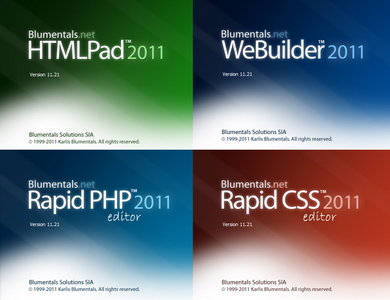
Blumentals HTMLPad / Rapid CSS / Rapid PHP / WeBuilder 11.2.1.130 Multilingual Portable

Web Development Tools. HTMLPad 2011 - mungkin untuk sekarang editor HTML yang terbaik di dunia. Cepat tanggap terhadap PHP 2011 - tercepat di dunia PHP IDE dan editor PHP. Cepat terhadap CSS 2011 - cascading gaya editor. WeBuilder 2011 - kelas editor kode pertama untuk pengembang web.HTMLPad adalah all-in-one yang sangat canggih HTML, CSS, JavaScript dan editor XHTML, dipercaya oleh ribuan pengembang web profesional dan pelajar di lebih dari 50 negara. Antarmuka yang clean dan nyaman, startup cepat, fleksibilitas benar dan fitur canggih memungkinkan Anda untuk membuat dan mengedit HTML, XHTML, CSS dan kode JavaScript yang lebih cepat dan lebih mudah dari sebelumnya, sementara alat yang terintegrasi memungkinkan Anda untuk memvalidasi, menggunakan kembali, menavigasi dan menyebarkan kode Anda dalam efisien dan cara canggih. Built-in CSS editor memungkinkan Anda untuk dengan mudah membuat dan mengedit cascading style sheet dari berbagai ukuran dan kompleksitas. Built-in JavaScript editor memudahkan untuk menangani JavaScript.Dengan Editor CSS Cepat Anda dapat dengan cepat dan mudah membuat dan mengedit cascading style sheet dari berbagai ukuran dan kompleksitas. Anda dapat menulis kode style sheet manual atau membiarkan program melakukannya untuk Anda. Dalam setiap kasus mudah karena fitur yang sangat membantu, termasuk auto lengkap, kode inspektur dan CSS checker. Hasilnya ditunjukkan langsung dengan preview built-in. Cepat CSS Editor dirancang untuk menghemat waktu dan membuat pekerjaan Anda lebih mudah.
Membuat dan mengedit kode halaman web lebih cepat dan lebih mudah.WeBuilder yang revolusioner semua-dalam-satu web editor kode untuk semua kebutuhan dokumen web editing Anda. 
Home Page - http://www.blumentals.net/
Blumentals HTMLPad 2011 11.2.1.130 Multilingual Portable

Blumentals Rapid CSS 2011 11.2.1.130 Multilingual Portable

Blumentals Rapid PHP 2011 11.2.1.130 Multilingual Portable

Blumentals WeBuilder 2011 11.2.1.130 Multilingual Portable

Download Joboshare iPhone Video Converter 3.1.4 Build 0202


Joboshare iPhone Video Converter adalah software video yang mudah digunakan untuk converter iPhone 3G dan iPhone, yang dapat mengkonversi semua file video populer termasuk WMV, RM, RMVB, MOV, DAT, VOB, MPEG, AVI, DivX, XviD, 3GP, dll, untuk film MP4 iPhone, iPhone MP4 layar lebar, iPhone MP4 video 3G atau iPhone 3G H.264 video untuk pemutaran pada Apple iPhone, iPhone 3G, iPhone 3GS, iPhone 4, iPhone 4S dengan berbagai pengaturan dan sangat cepat iPhone film konversi denan berbagai kecepatan .

Sebagai converter musik iPhone, iPhone Video Converter dapat mengkonversi Joboshare ke MP3 musik iPhone, M4A, WAV dari setiap format audio dan video, seperti WMA, MP2, OGG, RA, AC3, CDA dan sebagainya untuk pemutaran pada iPhone, iPhone 3G , iPhone 3GS, iPhone 4, iPhone 4S, iPod, iPad, iPad 2 dan Apple TV.

Joboshare iPhone Video Converter menyediakan dengan pilihan video sangat fleksibel editing seperti resolusi output, bit rate, frame rate, aspek rasio untuk menyesuaikan kualitas video output.

semoga software ini dapat membantu bagi anda pengguna iPhone.

HomePage: www.joboshare.com
Download Disini